Web-based Admin
Provided reviews, wireframes, and UI specifications for Openwave’s Email MX Administration solution.
This is a browser-based GUI that replaced command-line utilities for setting up and administering an email server network.
Web-based Admin
Provided reviews, wireframes, and UI specifications for Openwave’s Email MX Administration solution.
This is a browser-based GUI that replaced command-line utilities for setting up and administering an email server network.
Email Administration Console

Challenges
The original Email Admin customers were large companies with full-time Network Administration departments. Openwave Professional Services set up a customer’s mail network, then the NA department administered it using command-line utilities. The Admin Console was needed for new customers—smaller companies with non-expert network administrators. These users needed an easy-to-use interface to replace the utilities.
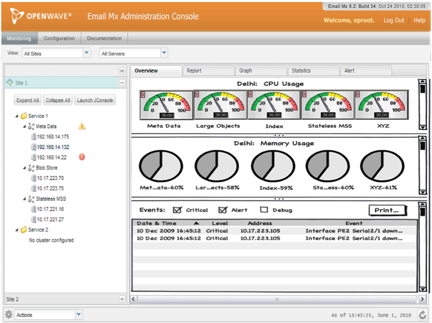
The challenge was threefold: (1) to show network objects within a structure, (2) to provide easy-to-use monitoring and configuration tasks, and (3) to provide simple filtering and navigation.
Solution
Openwave Professional Services helped us identify tasks that could be done independently of the command-line utilities. Customer employees would use the Administration Console to monitor the network and make routine configuration adjustments—e.g., load balancing, adding a server, re-starting a server, etc.
As much as possible, the GUI used graphics and visual features to provide a clean and obvious workflow for each task. For monitoring, the GUI provided real-time, high-level monitoring tools that support decisions about network performance and capacity—e..g, real-time dashboards, graphs, and reports that support decisions about configuration changes, network growth, solving “server down” issues, etc. The console window showed the network structure on the left side, with content for the selected site, cluster, or node on the right.